UIKit - UITextView placeholder 구현하기
UITextView는 UITextField와는 달리 placeholder를 설정할 수 있는 프로퍼티가 제공되지 않음.
따라서, 직접 delegate 메서드를 통해 구현해줘야함.
LargeInput.swift
1
2
3
4
5
6
7
8
9
10
11
12
13
14
15
16
17
18
19
20
21
22
23
24
25
26
27
28
29
30
31
32
33
34
35
36
37
38
39
40
41
42
43
44
45
46
47
48
49
50
51
52
53
54
55
56
57
58
59
60
61
62
63
64
65
66
67
68
69
70
71
72
73
74
75
76
77
78
79
80
import UIKit

final class LargeInput: UIView {

    private var textView: UITextView = {
        let textView = UITextView()

        textView.textContainerInset = UIEdgeInsets(top: 10, left: 8, bottom: 10, right: 8)

        textView.backgroundColor = UIColor(named: "TextFieldBackgroundColor")
        textView.textColor = .white

        textView.autocapitalizationType = .none

        textView.autocorrectionType = .no
        textView.spellCheckingType = .no

        textView.layer.borderWidth = 1
        textView.layer.borderColor = UIColor(named: "BorderColor")?.cgColor

        textView.layer.cornerRadius = 8
        textView.clipsToBounds = true

        textView.font = UIFont.systemFont(ofSize: 17)

        return textView
    }()

    let textViewPlaceholder: UILabel = {
        let label = UILabel()

        label.text = "placeholder"
        label.textColor = .placeholder

        return label
    }()

    override init(frame: CGRect) {
        super.init(frame: frame)

        // placeholder label subview로 추가
        textView.addSubview(textViewPlaceholder)

        // 오토레이아웃 제약 설정
        textViewPlaceholder.snp.makeConstraints { make in
            make.top.equalToSuperview().inset(10)
            make.leading.equalToSuperview().inset(10)
        }

        ...
    }

    required init?(coder: NSCoder) {
        fatalError("init(coder:) has not been implemented")
    }

    func setLabelText(label: String){
        self.label.text = label
    }

    func setPlaceholder(placeholder: String?){
        self.textViewPlaceholder.text = placeholder
    }

    func setValidationText(text: String){
        self.validationLabel.text = text
    }

    func setDelegate(delegate: UITextViewDelegate){
        self.textView.delegate = delegate
    }

    func getTextView() -> UITextView{
        return textView
    }

    func setValidationAlpha(alpha: CGFloat){
        self.validationLabel.alpha = alpha
    }
}
위와 같이 LargeInput이라는 컴포넌트에서 UITextView에 UILabel을 사용하여 placeholder를 표시하도록 처리함.
CreateBookViewController.swift
1
2
3
4
5
6
7
8
9
10
11
12
13
14
15
16
17
18
19
20
21
22
23
24
25
26
27
28
29
30
31
32
33
34
extension CreateBookViewController: UITextViewDelegate{

    // 텍스트가 변경될 시 실행
    func textViewDidChange(_ textView: UITextView) {

        // 텍스트가 비어있을 경우
        if textView.text.isEmpty{
            switch textView{
            case createBookView.getContentTextView():
                createBookView
                    .setContentPlaceholder(
                        placeholder: Constants.CONTENT_PLACEHOLDER
                    )
            case createBookView.getFeelingTextView():
                createBookView
                    .setFeelingPlaceholder(
                        placeholder: Constants.FEELING_PLACEHOLDER
                    )
            default:
                fatalError()
            }
        }else{
            // 텍스트가 비어있지 않을 경우
            switch textView{
            case createBookView.getContentTextView():
                createBookView.setContentPlaceholder(placeholder: nil)
            case createBookView.getFeelingTextView():
                createBookView.setFeelingPlaceholder(placeholder: nil)
            default:
                fatalError()
            }
        }
    }
}
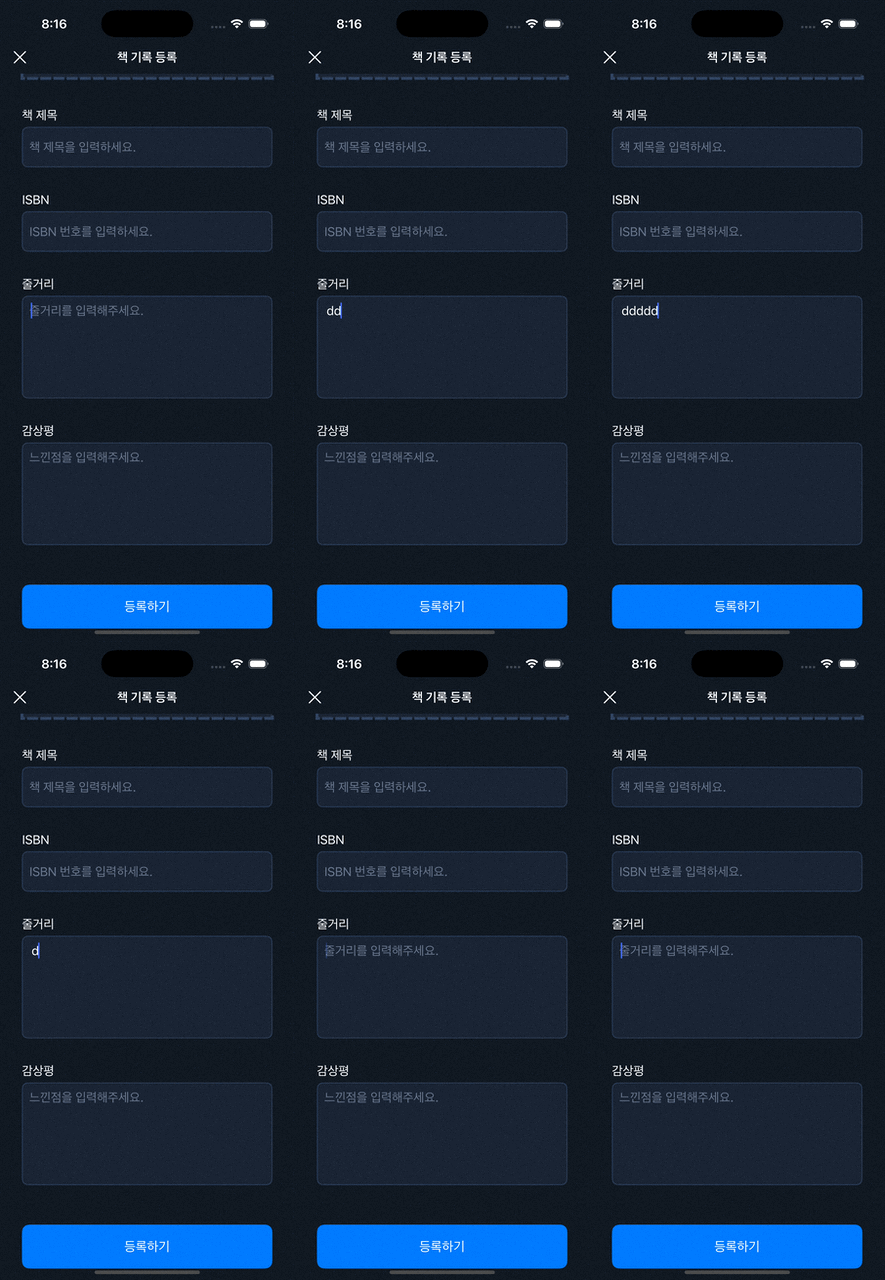
위 코드와 같이 delegate 프로토콜을 상속하여 placeholder 렌더링 여부를 결정하는 로직을 작성함.
결과
This post is licensed under CC BY 4.0 by the author.