Backend - Spring Security AuthenticationEntryPoint란?
Backend - Spring Security AuthenticationEntryPoint란?
Spring Security 예외 처리 구조
Spring Security의 예외 처리 구조는 아래와 같음.
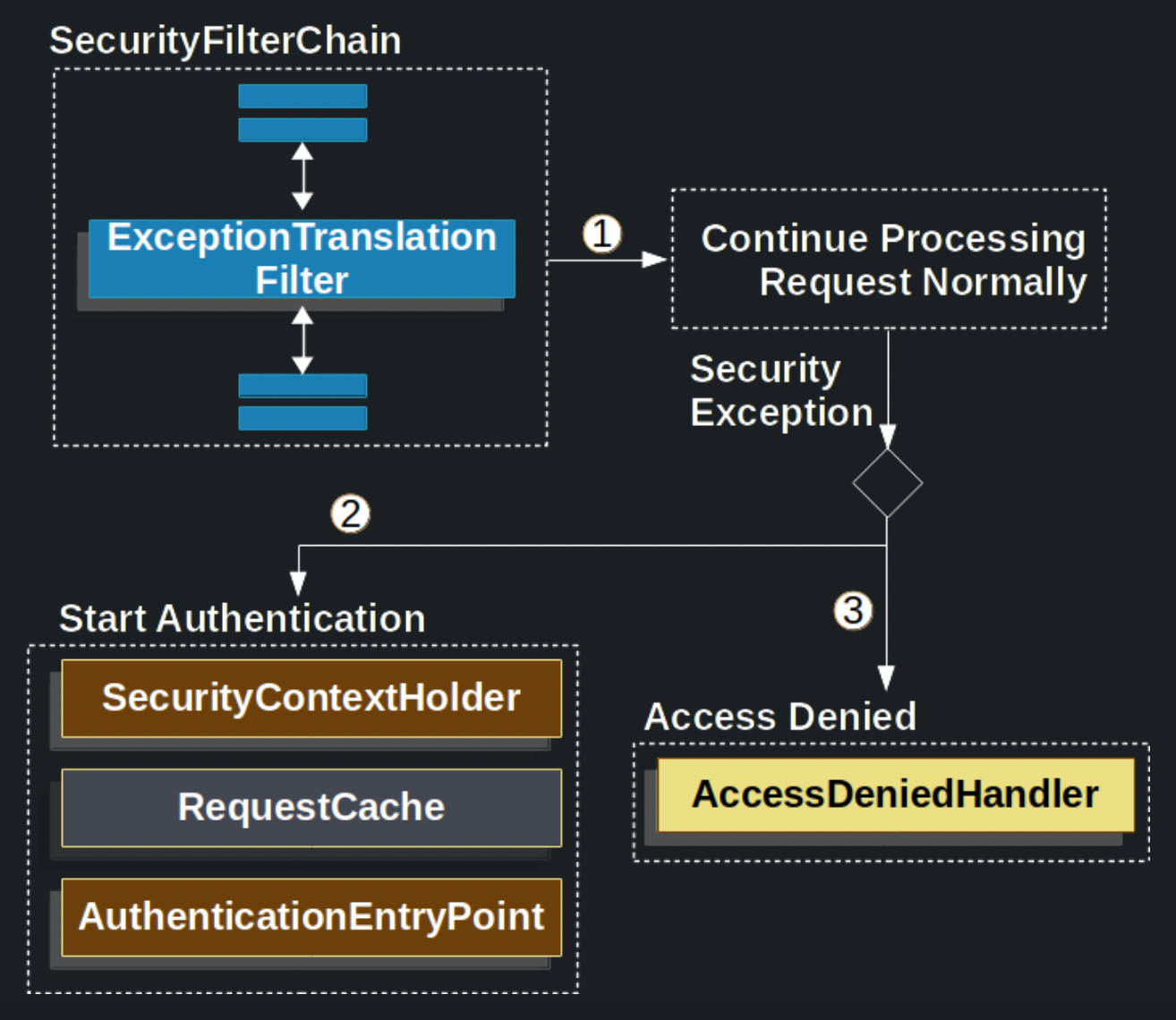
ExceptionTranslationFilter는FilterChain.doFilter(request, response)를 호출함.- 만약 사용자가 인증되지 않았거나,
AuthenticationException이 발생했다면 인증 절차를 시작함.SecurityContextHolder를 비움.HttpServletRequest를 저장해서 인증 성공 시 다시 원래 요청을 보낼 수 있도록함.AuthenticationEntryPoint는 클라이언트에게 자격 증명을 요청하기 위해 사용함. (ex. 로그인 페이지로 리다이렉션)
AccessDeniedException이 발생할 경우에는AccessDeniedHandler가 호출됨.
만약
AccessDeniedException,AuthenticationException예외가 발생하지 않는다면,ExceptionTranslationFilter는 아무것도 하지 않음.
AuthenticationEntryPoint 인터페이스
AuthenticationEntryPoint.java
1
2
3
public interface AuthenticationEntryPoint {
    void commence(HttpServletRequest request, HttpServletResponse response, AuthenticationException authException) throws IOException, ServletException;
}
commence 메서드는 인증되지 않은 사용자가 요청을 보내 AuthenticationException이 발생했을 경우에 호출된느 메서드임.
클라이언트에게 인증을 요청하는 동작을 수행함.
이 메서드를 구현하여 로그인 페이지로 리다이렉트 시키거나, json 형태의 에러를 내려보낼수도 있음.
실제 사용 예시
현재 RESTful API를 기반으로 개발을하고 있기 때문에 응답으로는 리다이렉트 대신 json 형태의 에러를 내려주도록 구현함.
CustomAuthenticationEntryPoint.java
1
2
3
4
5
6
7
8
9
10
11
12
13
14
15
16
17
18
19
20
21
22
23
24
25
@Component
@Slf4j
@RequiredArgsConstructor
public class CustomAuthenticationEntryPoint implements AuthenticationEntryPoint {

    private final ObjectMapper objectMapper;

    @Override
    public void commence(HttpServletRequest request, HttpServletResponse response, AuthenticationException authException) throws IOException, ServletException {
        log.error("Unauthenticated Request : ", authException);

        ResponseWrapper responseWrapper = ResponseWrapper.builder()
                .status(HttpStatus.UNAUTHORIZED.value())
                .message("인증되지 않은 사용자입니다.")
                .result(null)
                .build();

        String responseBody = objectMapper.writeValueAsString(responseWrapper);

        response.setContentType(MediaType.APPLICATION_JSON_VALUE);
        response.setStatus(HttpStatus.UNAUTHORIZED.value());
        response.setCharacterEncoding("UTF-8");
        response.getWriter().write(responseBody);
    }
}
참고
This post is licensed under CC BY 4.0 by the author.