UIKit - UITextField placeholder 색상 설정하기
UIKit - UITextField placeholder 색상 설정하기
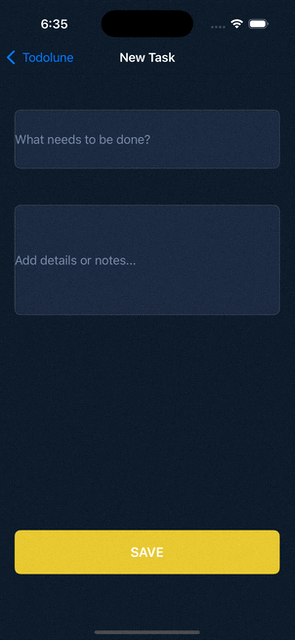
UITextField placeholder에 색상을 설정하는 것은 NSAttributedString을 사용해 처리 가능함.
UITextField+PlaceholderColor.swift
1
2
3
4
5
6
7
8
9
import UIKit

extension UITextField{

    func setPlaceholderColor(color: UIColor){
        guard let placeholder = self.placeholder else { return }
        attributedPlaceholder = NSAttributedString(string: placeholder, attributes: [NSAttributedString.Key.foregroundColor: color])
    }
}
TodoAddView.swift
1
2
3
4
5
6
7
8
9
10
11
12
13
14
15
16
17
18
19
20
21
22
23
24
25
26
27
28
29
30
31
32
33
34
35
36
37
38
39
40
41
42
43
44
45
46
47
48
49
50
import UIKit

class TodoAddView: UIView {

    // MARK: - 할일 제목 텍스트 필드
    private let todoTitleTextField: UITextField = {
        let textField = UITextField()

        textField.backgroundColor = UIColor(named: "textFieldColor")
        textField.placeholder = "What needs to be done?"

        // placeholder 색상 설정
        textField.setPlaceholderColor(color: .createdDate)

        textField.layer.borderColor = UIColor.gray.cgColor
        textField.layer.borderWidth = 0.3

        textField.textColor = .white
        textField.clipsToBounds = true
        textField.layer.cornerRadius = 8

        textField.translatesAutoresizingMaskIntoConstraints = false

        return textField
    }()

    // MARK: - 할일 세부 사항(또는 메모) 텍스트 필드
    private let todoDescriptionTextField: UITextField = {
        let textField = UITextField()

        textField.backgroundColor = UIColor(named: "textFieldColor")
        textField.placeholder = "Add details or notes..."

        // placeholder 색상 설정
        textField.setPlaceholderColor(color: .createdDate)

        textField.layer.borderColor = UIColor.gray.cgColor
        textField.layer.borderWidth = 0.3

        textField.textColor = .white
        textField.clipsToBounds = true
        textField.layer.cornerRadius = 8

        textField.translatesAutoresizingMaskIntoConstraints = false

        return textField
    }()

    ...
}
결과
Reference
This post is licensed under CC BY 4.0 by the author.