UIKit - UIStackView padding 설정하기
UIKit - UIStackView padding 설정하기
UIStackView에 padding을 설정하기 위해선 먼저 isLayoutMarginsRelativeArrangement 프로퍼티 값을 true로 설정해줘야함.
isLayoutMarginsRelativeArrangement 프로퍼티는 margin 사용 여부에 대한 값임.
true로 설정하지 않을 경우padding값이 적용되지 않음.
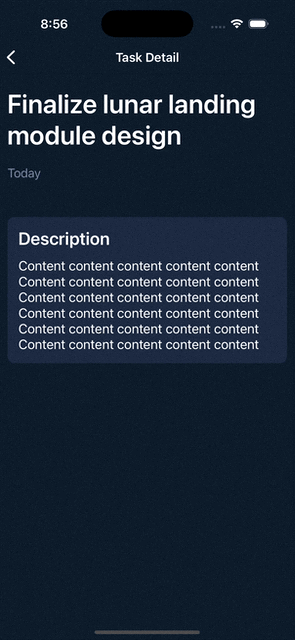
UIStackView의 directionalLayoutMargins 프로퍼티를 통해 padding을 설정할 수 있음.
directionalLayoutMargins프로퍼티는NSDirectionalEdgeInsets타입을 받는데, 이 타입은UIEdgeInsets처럼left,right가 아닌leading,trailing을 받기 때문에 아랍권처럼 RTL(글 방향이 오른쪽 -> 왼쪽) 환경까지도 지원 가능함.
TodoDetailView.swift
1
2
3
4
5
6
7
8
9
10
11
12
13
14
15
16
17
18
19
20
21
22
23
24
import UIKit

class TodoDetailView: UIView {

  ...

    private lazy var stackView: UIStackView = {
        let stackView = UIStackView(arrangedSubviews: [displayDescriptionLabel, todoDescriptionLabel])

        ....

        // isLayoutMarginsRelativeArrangement 프로퍼티 true 설정
        stackView.isLayoutMarginsRelativeArrangement = true

        // stackview padding 설정
        stackView.directionalLayoutMargins = NSDirectionalEdgeInsets(top: 15, leading: 15, bottom: 15, trailing: 15)

        ...

        return stackView
    }()

  ...
}
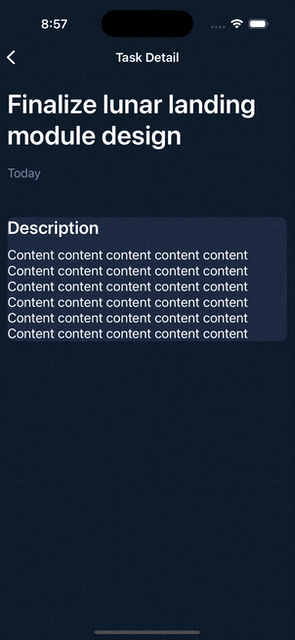
padding 적용 전 화면
padding 적용 후 화면
Reference
This post is licensed under CC BY 4.0 by the author.