Backend - Thymeleaf 템플릿 조각
Backend - Thymeleaf 템플릿 조각
Thymeleaf에 템플릿 조각에 대해 알아보자.
템플릿 조각이란?
템플릿 조각이란 쉽게 생각하면 컴포넌트의 개념과 비슷하다.
반복되는 요소들(ex. header, footer)을 템플릿 조각으로 만들어 재사용성과 유지보수성을 높일 수 있다.
템플릿 조각 사용
템플릿 조각을 설정할 때는 th:fragment 속성을 사용하여 설정한다.
예시
1
2
3
4
5
6
7
8
9
10
11
12
13
14
15
16
17
<!DOCTYPE html>
<html xmlns:th="http://www.thymeleaf.org">
<head>
    <meta charset="UTF-8">
    <title>Title</title>
</head>
<body>
<header th:fragment="header">
  <h1>헤더 템플릿 조각</h1>
</header>

<div th:fragment="divParam (data1, data2)">
  <p th:text="${data1}"></p>
  <p th:text="${data2}"></p>
</div>
</body>
</html>
사용할 때는 th:insert, th:replace를 통해 템플릿 조각을 불러올 수 있고 파라미터도 넘길 수 있다.
이 글에서는
th:insert만을 사용한다.
예시
1
2
3
4
5
6
7
8
9
10
11
12
13
14
<!DOCTYPE html>
<html xmlns:th="http://www.thymeleaf.org">
<head>
    <meta charset="UTF-8">
    <title>Title</title>
</head>
<body>
<h1>템플릿 조각 사용</h1>
<div th:insert="~{template/fragment/fragmentPractice :: header}"></div>

<h1>파라미터 값 사용</h1>
<div th:insert="~{template/fragment/fragmentPractice :: divParam ('Hello', 'Thymeleaf')}"></div>
</body>
</html>
위 코드와 같이 th:insert 속성을 사용한 후 ~{} 문법을 사용해서 사용할 템플릿 조각과 파라미터 값을 설정할 수 있다.
렌더링 결과
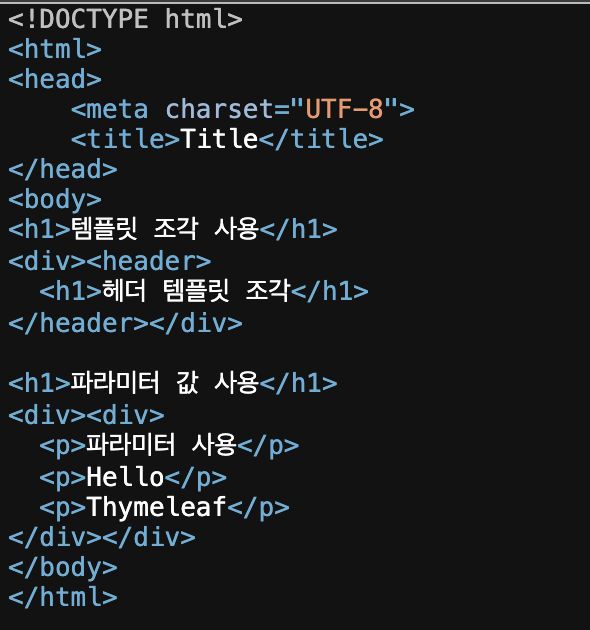
위와 같이 th:insert는 해당 속성을 사용한 요소 안에 템플릿 조각을 삽입한다.
th:replace는 해당 속성을 사용한 요소를 대체시킨다.
This post is licensed under CC BY 4.0 by the author.