UIKIt - UITableView Section 나누기
UIKIt - UITableView Section 나누기
UITableView에서 Section을 분리하려면 UITableViewDataSource의 메서드를 구현하면 됨.
사용 메서드
| 메서드 | 설명 |
|---|---|
numberOfSections(in:) | Section 개수 반환 |
tableView(_:numberOfRowsInSection:) | 특정 Section의 행 개수 반환 |
tableView(_:cellForRowAt:) | 특정 Section의 행과 Cell 반환 |
SettingViewController.swift
1
2
3
4
5
6
7
8
9
10
11
12
13
14
15
16
17
18
19
20
21
22
23
24
25
26
27
28
29
30
31
32
33
34
35
36
37
final class SettingViewController: UIViewController {

    // 요소 정의
    private let cellList: [[SettingCellDto]] = [
        [
            SettingCellDto(text: "정보 수정", image: UIImage(systemName: "person.fill", withConfiguration: UIImage.SymbolConfiguration(pointSize: 22))),
            SettingCellDto(text: "비밀번호 변경", image: UIImage(systemName: "lock.fill", withConfiguration: UIImage.SymbolConfiguration(pointSize: 22)))
        ],
        [
            SettingCellDto(text: "로그아웃", image: UIImage(systemName: "rectangle.portrait.and.arrow.right", withConfiguration: UIImage.SymbolConfiguration(pointSize: 22)))
        ]
    ]

}

extension SettingViewController: UITableViewDelegate, UITableViewDataSource{

    // Section 개수 반환
    func numberOfSections(in tableView: UITableView) -> Int {
        return cellList.count
    }

    // 특정 Section의 행 개수 반환
    func tableView(_ tableView: UITableView, numberOfRowsInSection section: Int) -> Int {
        return cellList[section].count
    }

    // 특정 Section의 행과 Cell 반환
    func tableView(_ tableView: UITableView, cellForRowAt indexPath: IndexPath) -> UITableViewCell {
        let cell = tableView.dequeueReusableCell(withIdentifier: SettingTableViewCell.identifier, for: indexPath) as! SettingTableViewCell
        let cellData = cellList[indexPath.section][indexPath.row]
        cell.iconText.textLabel.text = cellData.text
        cell.iconText.iconImage.image = cellData.image

        return cell
    }
}
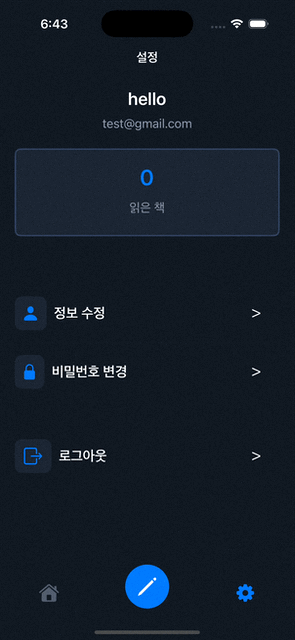
결과
Reference
This post is licensed under CC BY 4.0 by the author.