Troubleshooting - Terminating app due to uncaught exception 'NSInternalInconsistencyException', reason: 'Invalid update: invalid number of rows in section 0.
Troubleshooting - Terminating app due to uncaught exception 'NSInternalInconsistencyException', reason: 'Invalid update: invalid number of rows in section 0.
에러
CoreData를 통해 데이터를 저장하고 있으며, UITableView에 표시된 데이터가 삭제될 때는 deleteRows 메서드를 통해 제거하도록 처리하였음.
ViewController.swift
1
2
3
4
5
6
7
8
9
10
11
12
13
14
15
16
17
18
19
20
21
22
23
24
25
26
extension ViewController: UITableViewDelegate{

    func tableView(_ tableView: UITableView, trailingSwipeActionsConfigurationForRowAt indexPath: IndexPath) -> UISwipeActionsConfiguration? {

        let deleteButton = UIContextualAction(style: .destructive, title: nil) { _, _, success in

            let todos = self.todoManager.getTodoList()

            let todo = todos[indexPath.row]

            self.todoManager.deleteTodo(uuid: todo.todoId!)

            self.tableView.beginUpdates()
            self.tableView.deleteRows(at: [indexPath], with: .fade)
            self.tableView.endUpdates()

            success(true)
        }

        deleteButton.image = UIImage(systemName: "trash")

        return UISwipeActionsConfiguration(actions: [deleteButton])
    }

    ...
}
테스트 도중 아래와 같은 에러가 발생함.
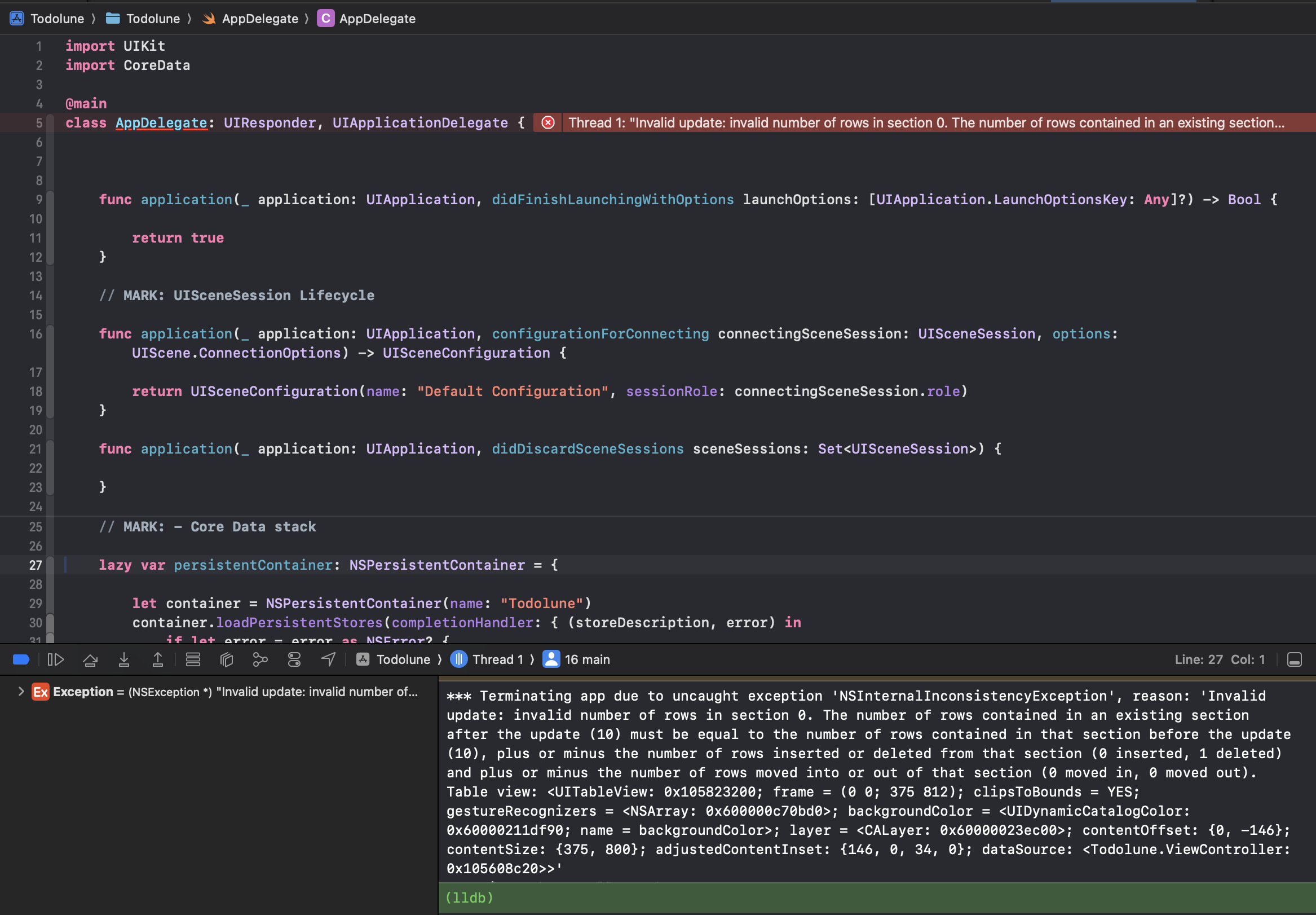
에러 메시지
1
*** Terminating app due to uncaught exception 'NSInternalInconsistencyException', reason: 'Invalid update: invalid number of rows in section 0. The number of rows contained in an existing section after the update (10) must be equal to the number of rows contained in that section before the update (10), plus or minus the number of rows inserted or deleted from that section (0 inserted, 1 deleted) and plus or minus the number of rows moved into or out of that section (0 moved in, 0 moved out). Table view: <UITableView: 0x105823200; frame = (0 0; 375 812); clipsToBounds = YES;
원인
기존에는 CoreData에서 조회된 데이터를 바로 tableView에 넣도록 처리하였었음.
ViewController.swift
1
2
3
4
5
6
7
8
9
10
11
extension ViewController: UITableViewDataSource{

    func tableView(_ tableView: UITableView, numberOfRowsInSection section: Int) -> Int {
        guard let todoList = coreDataManager.fetchTodoList() else { return }

        return todoList.count
    }

    ...

}
위 코드처럼 처리하고 있던 코드를 무한 스크롤을 구현하면서 아래와 CoreData를 통해 조회한 데이터를 TodoManager의 선언된 배열에 담고, 그 배열을 통해 처리하도록 변경함.
ViewController.swift
1
2
3
4
5
6
7
8
9
10
11
12
13
14
15
16
17
18
// MARK: - 테이블뷰 DataSource
extension ViewController: UITableViewDataSource{

    func tableView(_ tableView: UITableView, numberOfRowsInSection section: Int) -> Int {
        let todoList = todoManager.getTodoList()

        if todoList.count == 0 {
            tableView.setupEmptyView(message: "Your task list is empty.")
        }else{
            tableView.removeEmptyView()
        }

        return todoList.count
    }

    ...
}
이 상태에서 구현된 deleteRows 처리 메서드가 실행되면 CoreData에 저장된 데이터는 지워지지만, 실제로 UITableView를 그리는데 사용되는 배열에 데이터는 그대로 남게됨.
그래서, UITableView에 행의 개수와 실제 표시되는 행의 개수가 일치하지 않아서 발생함.
해결
ViewController.swift
1
2
3
4
5
6
7
8
9
10
11
12
13
14
15
16
17
18
19
20
21
22
23
24
25
26
27
28
29
30
31
32
33
34
35
// MARK: - 테이블뷰 Delegate
extension ViewController: UITableViewDelegate{

    func tableView(_ tableView: UITableView, trailingSwipeActionsConfigurationForRowAt indexPath: IndexPath) -> UISwipeActionsConfiguration? {

        let deleteButton = UIContextualAction(style: .destructive, title: nil) { _, _, success in

            let todos = self.todoManager.getTodoList()

            let todo = todos[indexPath.row]

            guard let uuid = todo.todoId else { return }

            // CoreData에 저장된 데이터 제거
            self.todoManager.deleteTodo(uuid: uuid)

            // UITableView를 그리는데 사용되는 배열에서 데이터 제거
            var todoList = self.todoManager.getTodoList()
            todoList.remove(at: indexPath.row)
            self.todoManager.setTodoList(todoList: todoList)

            // deleteRows 실행
            self.tableView.beginUpdates()
            self.tableView.deleteRows(at: [indexPath], with: .fade)
            self.tableView.endUpdates()

            success(true)
        }

        deleteButton.image = UIImage(systemName: "trash")

        return UISwipeActionsConfiguration(actions: [deleteButton])
    }

}
This post is licensed under CC BY 4.0 by the author.