UIKit - UITableViewCell 간격 설정하기
UIKit - UITableViewCell 간격 설정하기
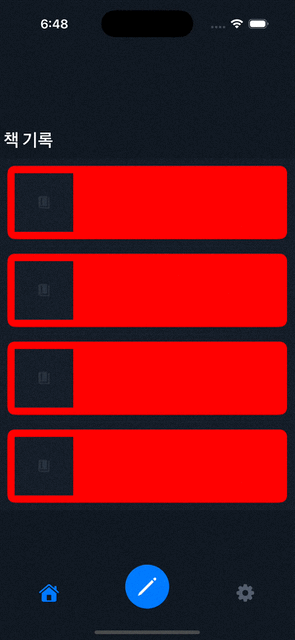
TableViewCell에 간격을 주는 방법으로는 layoutSubviews 메서드를 오버라이딩 하여 처리할 수 있음.
예시 코드
1
2
3
4
5
6
7
8
9
10
11
12
13
14
15
16
17
18
19
20
21
22
23
24
25
26
27
28
29
30
31
32
33
34
import UIKit

final class BookListTableViewCell: UITableViewCell {

    override func setSelected(_ selected: Bool, animated: Bool) {
        super.setSelected(selected, animated: animated)

        setupUI()
    }

    override func layoutSubviews() {
        super.layoutSubviews()
        // 간격 설정
        contentView.frame = contentView.frame.inset(by: UIEdgeInsets(top: 10, left: 10, bottom: 10, right: 10))

        // corner radius 설정
        contentView.layer.cornerRadius = 10
        contentView.clipsToBounds = true
    }

    private func setupUI(){
      // TableViewCell에 표시할 View들을 contentView에 추가
        self.contentView.addSubview(stackView)
        self.contentView.backgroundColor = .red

        leftImageView.snp.makeConstraints { make in
            make.width.equalTo(80)
        }

        stackView.snp.makeConstraints { make in
            make.edges.equalToSuperview().inset(10)
        }
    }
}
결과
Reference
This post is licensed under CC BY 4.0 by the author.