UIKit - Hugging, Compression Priority 개념 및 사용하기
UIKit - Hugging, Compression Priority 개념 및 사용하기
Hugging과 Compression 우선순위에 대한 개념이 잡혀있지 않은 상태에서 아래와 같이 Title Label에 고유 콘텐츠 크기가 늘어날 때 CreatedAt Label 요소가 밀려 사라지는 문제가 발생함.
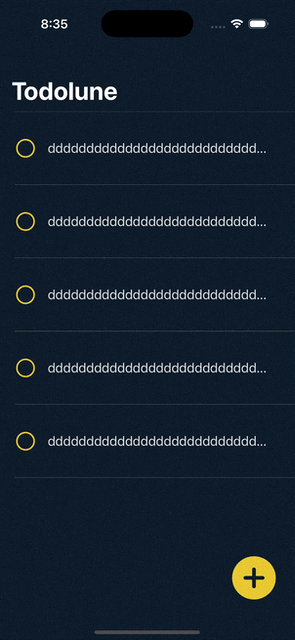
이런 경우 Hugging, Compression 우선순위를 조정해 해결할 수 있음.
Hugging Priority와 Compression Priority란?
Hugging Priority: 콘텐츠 크기보다 더 커지지 않으려는 우선순위- 우선순위가 높은 요소는 여유 공간 많아도 늘어나지 않음.
- 우선순위가 더 낮은 요소가 늘어나게 됨.
Compression Priority: 콘텐츠 크기보다 더 줄어들지 않으려는 우선순위- 우선순위가 높은 요소는 여유 공간이 부족해도 최대한 줄어들지 않음.
- 우선순위가 낮은 요소가 여유 공간이 부족할 때 줄어들게 됨.
Hugging, Compression Priority 조정
TodoCell.swift
1
2
3
4
5
6
7
8
9
10
11
12
13
14
15
16
17
18
19
20
21
22
23
24
25
26
27
28
29
30
31
32
33
import UIKit

class TodoCell: UITableViewCell {

  ...

    private lazy var stackView: UIStackView = {
        let stackView = UIStackView(arrangedSubviews: [isCompletedCheckbox, todoTitleLabel, createdAtLabel])

        stackView.axis = .horizontal
        stackView.spacing = 15
        stackView.alignment = .fill
        stackView.distribution = .fill

        // 생성 날짜 표시 Label 여유 공간이 있을 때도 고유 크기를 유지하도록 Hugging 우선순위를 높게 설정
        createdAtLabel.setContentHuggingPriority(.required, for: .horizontal)

        // 생성 날짜 표시 Label 여유 공간이 없을 때도 고유 크기를 최대한 유지하도록 Compression 우선순위를 높게 설정
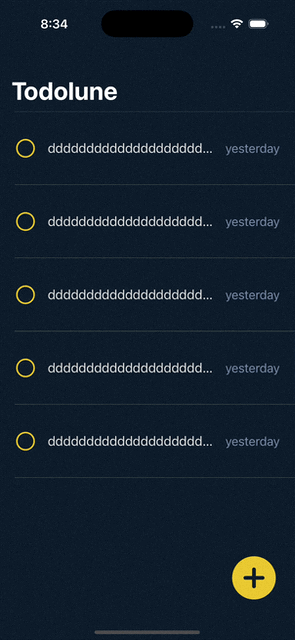
        createdAtLabel.setContentCompressionResistancePriority(.required, for: .horizontal)

        // 제목 표시 Label 여유 공간이 있을 때 늘어나도록 생성 날짜 표시 Label보다 우선순위를 낮게 설정
        todoTitleLabel.setContentHuggingPriority(.defaultLow, for: .horizontal)

        // 제목 표시 Label 여유 공간이 없을 때 줄어들도록 생성 날짜 표시 Label보다 우선순위를 낮게 설정
        todoTitleLabel.setContentCompressionResistancePriority(.defaultLow, for: .horizontal)

        stackView.translatesAutoresizingMaskIntoConstraints = false

        return stackView
    }()

  ...
}
우선순위 값은 1 ~ 1000 사이로 지정 가능하며, 값이 높을수록 우선순위가 높다는 뜻임.
.required는 1000,.defaultHigh는 750,.defaultLow는 250을 의미함.
결과
Reference
This post is licensed under CC BY 4.0 by the author.